
Skills
Skills are reusable instructions you can attach to an agent message.
Use a skill when you want the agent to follow a specific process, checklist, style guide, testing routine, or definition of done. A skill is guidance for the agent. It does not change Buildprint permissions, Bubble collaborator permissions, the selected branch, or whether the chat is in Plan mode or Build mode.
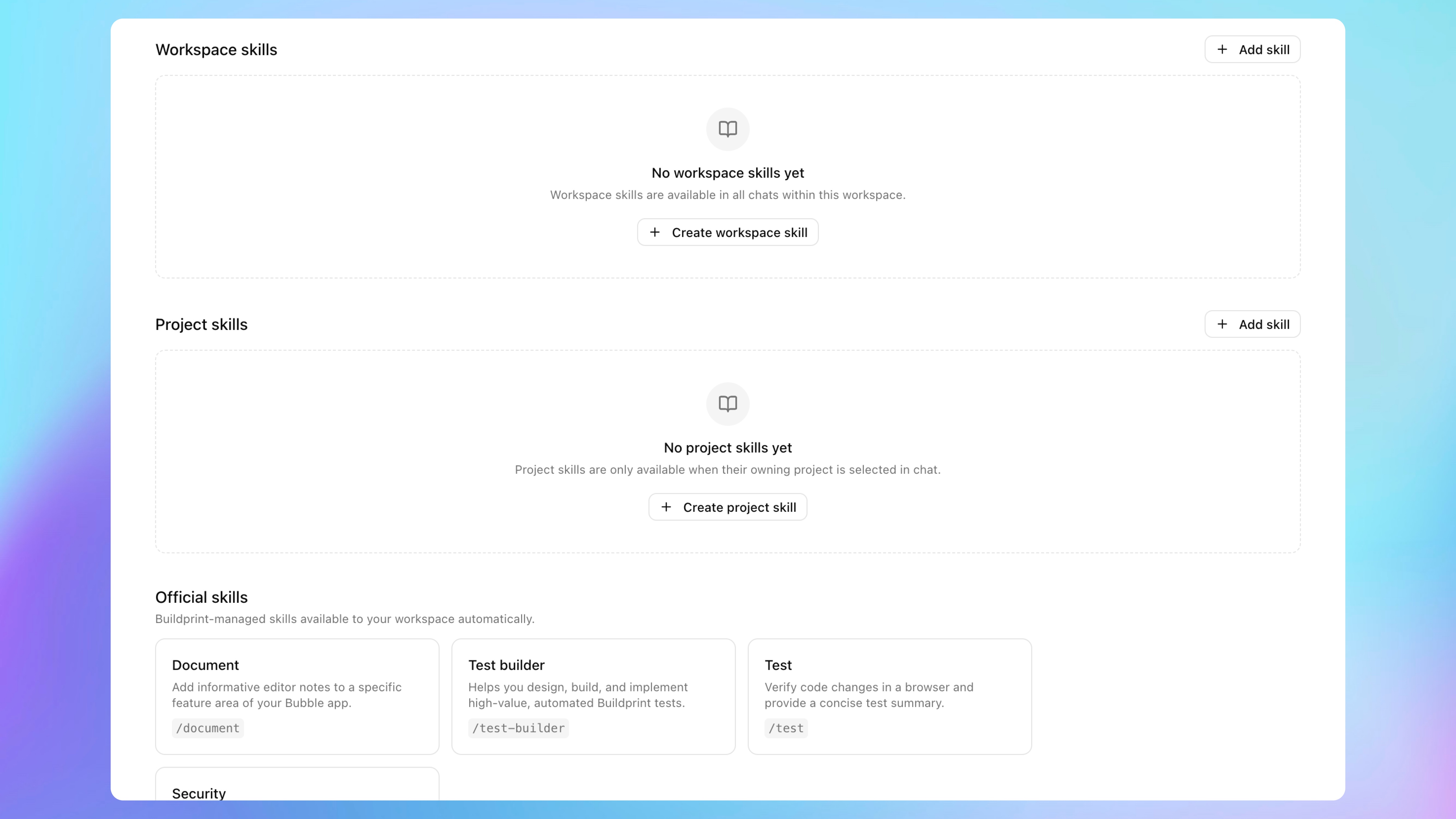
Skill scopes
Buildprint supports three skill scopes.
Official skills
Official skills are managed by Buildprint and are available automatically.
The exact list can change over time. Open Skills to see the official skills currently available to your workspace.
Official skills are read-only.
Workspace skills
Workspace skills are available across chats in the workspace.
Use workspace skills for team-wide instructions, such as review checklists, writing style, QA standards, or common delivery rules.
Workspace admins can create and manage workspace skills.
Project skills
Project skills are available when their owning project is selected in chat.
Use project skills for app-specific instructions, such as naming conventions, testing accounts, workflow rules, or product constraints that only apply to one Bubble app.
Users with access to the project can create or manage project skills, subject to current product permissions.
Create a skill
Open Skills.
Choose whether to create a workspace skill or project skill. For a project skill, select the project it belongs to.
Add:
A clear name.
Skill instructions.
Buildprint generates a slash-style skill slug from the name, such as /bug-triage.
Click Create skill.
Use a skill in chat
In the chat composer, type / or @ to open the command menu. You can also use the add-context button in the composer.
Select a skill from the Skills section.
The selected skill appears as a chip in the composer. Send your message as usual.
A skill is attached to that message only. Attach it again if you want the agent to follow it on a later turn.
What to put in a skill
Good skills are specific. They tell the agent what to do, what to avoid, and what output you expect.
A useful skill usually includes:
The goal of the skill.
The steps the agent should follow.
Checks the agent should run.
Constraints, style rules, or edge cases.
What the final answer should include.
Example:
Goal: Review a Bubble workflow change before it is merged.

Steps:
- Inspect the changed workflow and related data types.
- Look for privacy, authentication, payment, and error-handling risks.
- Suggest tests for the development branch.

Constraints:
- Do not recommend schema changes unless they are required.
- Keep comments focused on issues that could affect users.

Output:
- List blockers first.
- Then list non-blocking suggestions.
- End with tests to run before merging.
Edit or archive a skill
From Skills, open a skill you can manage.
Use Save changes to update the name or instructions.
Use Archive when the skill should no longer appear in chat.
Keep skills safe
Do not put secrets in skills.
Avoid adding:
Private keys.
API tokens.
Passwords.
Cookies.
Customer data.
Internal credentials.
Anything you would not want sent to the selected model provider.
If a secret is exposed in a skill, rotate it in the original provider.