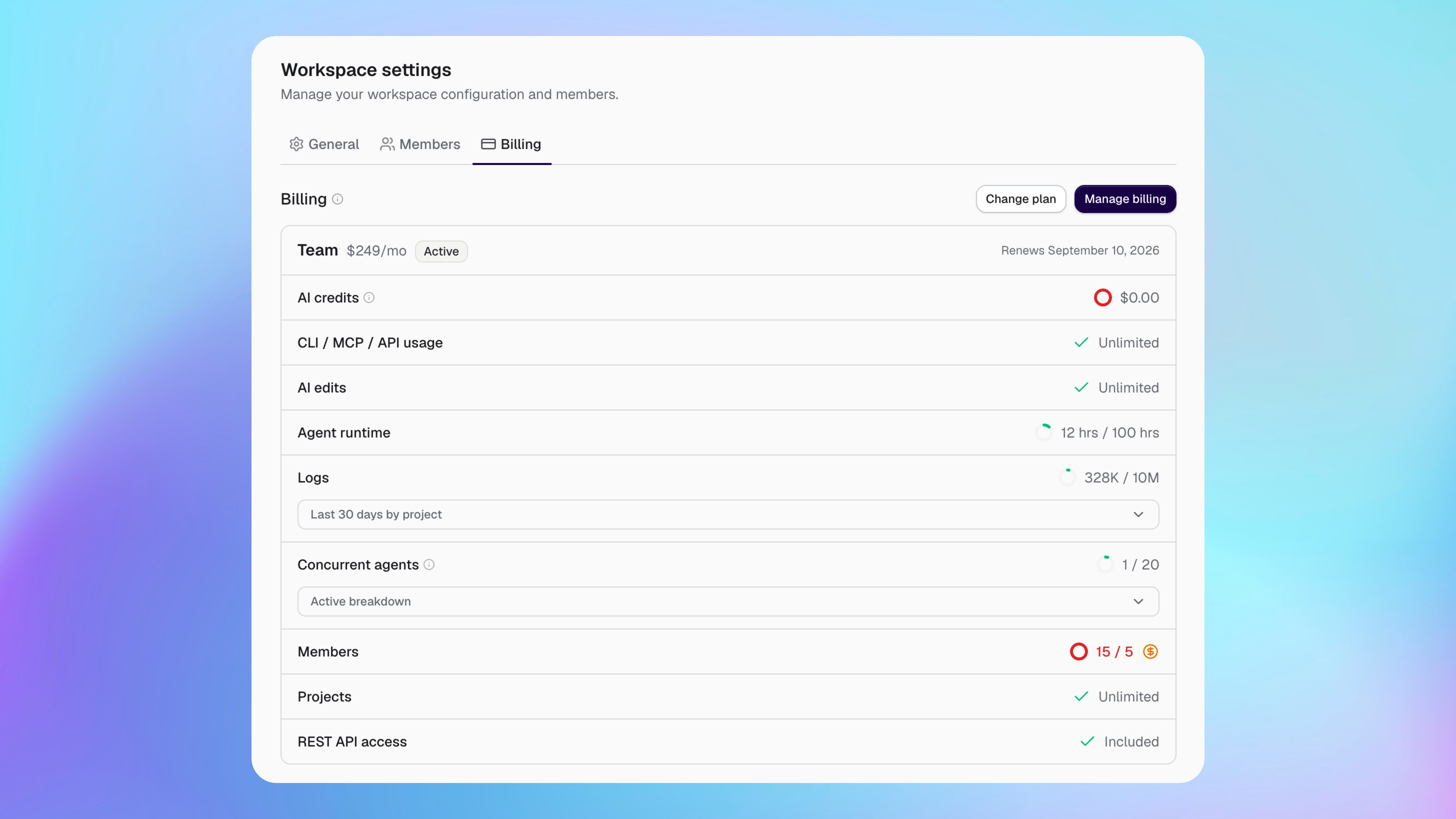
Buildprint charges your workspace for its plan, any billable members or projects above the included amount, and metered usage that exceeds the plan allowance.
Choose a plan
Choose the plan that matches how often you use Buildprint and how many people and projects you manage.
Free is for trying Buildprint on a project.
Pro is for individual Bubble builders who use Buildprint regularly.
Team is for teams working across more people and projects.
Enterprise provides custom allowances, volume pricing, onboarding and support for larger teams and agencies. Contact us to arrange this.
Select Change plan on the Billing page to compare the current prices and included allowances. The plan selector also shows the price for usage above an allowance when overages are available.
Understand your bill
Your total can include a recurring plan charge and usage-based charges.
Plan: the base price for your workspace subscription.
Members: people with a billable workspace seat. Some plans include a fixed number and charge for additional members. Additional seats are prorated, so you only pay for the part of the subscription month when the seat was active.
Projects: connected Bubble apps or plugins. Some plans include a fixed number and charge for additional projects.
AI credits: the cost of using Buildprint-managed AI models. We charge these model calls at cost.
Agent runtime: the time Agent spends running in its virtual machine. Your plan includes an allowance, then usage-based overages can apply.
Logs: the number of log events stored through Buildprint-managed Logs. Your plan includes an allowance, then usage-based overages can apply.
The plan comparison shows which charges and overages apply to each plan before you change it.
Using your own connected ChatGPT or Claude subscription does not use Buildprint AI credits. Agent runtime is still counted while Agent is running.
Understand the other usage rows
The Billing page also shows access and limits that do not always add a charge to your bill.
CLI / MCP / API usage shows the combined allowance for requests made through these developer tools. Unlimited means the plan has no metered allowance.
AI edits shows whether edits made with AI are limited or unlimited on the plan.
Concurrent agents is the maximum number of agents that can run at the same time. This is a capacity limit, not the total number of conversations.
REST API access shows whether the plan includes access to the REST API.
When a feature has a fixed limit without overage pricing, Buildprint stops further use after the allowance is reached. Change plan to increase the allowance.
Read your usage
Open Workspace settings and select Billing to see usage for the current billing period.
Each row shows the amount used and the amount included. A red value means usage is above the included allowance. Select the overage indicator to see how the additional charge is calculated.
Logs also includes a per-project breakdown for the last 30 days. Concurrent agents includes a breakdown of the agents that are currently active.
Billing periods and resets
The Billing page shows when your plan renews and when usage allowances reset.
Monthly usage, including Agent runtime and Logs, is measured across the workspace. Unused allowance does not carry into the next period.
We calculate overages at the end of the subscription month and add them to the renewal charge. This includes prorated charges for additional member seats added during that month.
Change or cancel your plan
Only workspace Admins can change billing.
Open Workspace settings.
Select Billing.
Select Change plan.
Choose the new plan and confirm the change.
An upgrade can start immediately. A downgrade or cancellation can be scheduled for the end of the current billing period. The Billing page shows the scheduled date, and you can cancel the scheduled downgrade before it takes effect.
A workspace Member can request an upgrade, but a workspace Admin must complete it.
Manage payment details and invoices
Workspace Admins can select Manage billing to open the billing portal.
Use the portal to manage the workspace’s payment method, invoices and subscription billing details.
Avoid unexpected charges
Check the Billing page regularly when your workspace is growing or using Agent and Logs heavily.
Review the included allowance and overage rate before changing plan.
Remove members who no longer need a billable seat.
Check which projects produce the most logs.
Review Agent runtime when several people use Agent regularly.
Use your own AI provider when you do not want to use Buildprint AI credits.
Why am I using agent runtime?
Agent runtime is used by any deployed agents on Buildprint. Agents run through chat, radar, and tests. If you use Buildprint only by MCP, then MCP clients may deploy agents through the MCP.
If you do not want to use Buildprint runtime at all, you must use only the CLI, and run agents on your machine.
How do I disable logs overages?
You can disable log sync by going to Logs -> Scroll to bottom where you can disable log sync.