
Log sync must be enabled for the project. Check its status under Logs → View.
Monitors
Monitors watch your synced Bubble logs and notify you when a condition you care about is met.
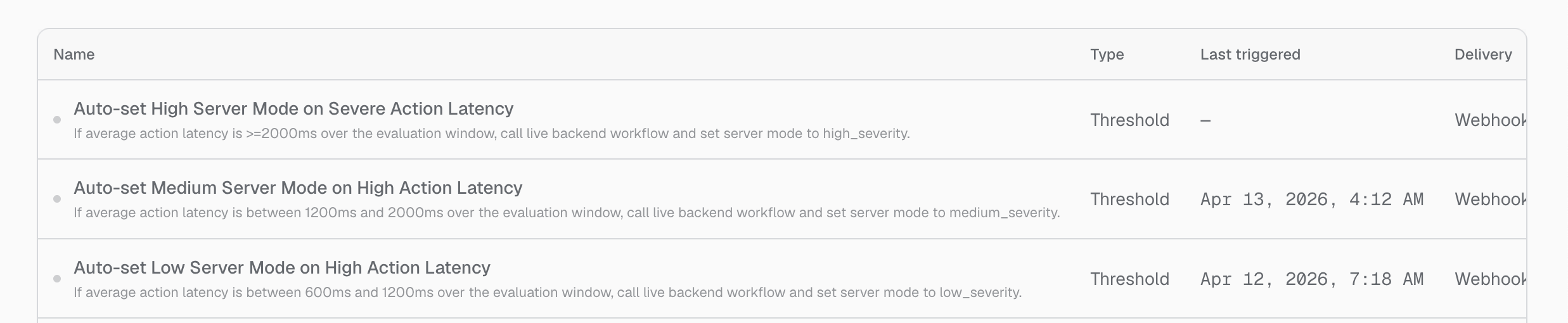
Create a monitor
Create monitors through Buildprint Agent or through a connected Buildprint MCP client.
Describe the behaviour you want to detect, the time window, and how you want to be notified. For example:
Create a monitor for this project that triggers when average action latency is above 2,000 milliseconds. Send the event to my configured webhook.
Agent can inspect your logs and help turn the request into a suitable monitor. Review the condition before relying on it.
Choose notification delivery
A monitor can deliver events by webhook or email.
Webhook sends the event to the configured URL with any custom authentication headers.
Email is used when no webhook is configured. Buildprint emails project members and workspace admins.
Email notifications are limited to three per monitor per hour and ten per monitor per day.
Manage monitors
Open Logs → Monitors to review and maintain existing monitors.
Each monitor shows its name, type, last trigger, delivery method, and whether it is enabled. From its menu, you can:
Enable or disable it.
Change its name, webhook URL, or headers.
Send a test notification.
Delete it.
You need permission to manage project settings to change or delete a monitor.
Review monitor events
The event history shows when monitors triggered and whether delivery is pending, complete, or failed.
Filter the history to one monitor when investigating repeated alerts. For webhook events, you can view and copy the payload sent by Buildprint.
Troubleshooting
I cannot open Monitors
I cannot edit a monitor
You need project-settings access. Ask a project or workspace admin to update the monitor.
A webhook does not receive events
Check the webhook URL and authentication headers, then use Send test notification. Review recent monitor events for a delivery error.
Too many email alerts are missing
Email delivery is rate-limited per monitor. Use a webhook when you need every event sent to another system.
Was this helpful?
Was this helpful?